Working With Parent Accounts
In this tutorial, we'll continue from the perspective of a wallet or marketplace app who seeks to facilitate a unified account experience, and abstract away the partitioned access between accounts into a single dashboard for user interactions on all their owned assets.
Objectives
- Understand the Hybrid Custody account model.
- Differentiate between restricted child accounts and unrestricted owned accounts.
- Get your app to recognize "parent" accounts along with any associated "child" accounts.
- View Fungible and NonFungible Token metadata relating to assets across all of a user's associated accounts - their wallet-mediated "parent" account and any hybrid custody model "child" accounts.
- Facilitate transactions acting on assets in child accounts.
Design Overview
TL;DR: An account's HybridCustody.Manager is the entry point for all of a user's associated accounts.
The basic idea in the Hybrid Custody model is relatively simple. A parent account is one that has received delegated (albeit restricted) access on another account. The account which has delegated authority over itself to the parent account is the child account.
In the Hybrid Custody Model, this child account would have shared access between the app - the entity which created and likely custodies the account - and the linked parent account.
How does this delegation occur? Typically when we think of shared account access in crypto, we think keys. However, Cadence allows accounts to link Capabilities on themselves and issue those Capabilities to other parties (more on capability-based access here).
This feature was leveraged in an ecosystem standard so that apps can implement a hybrid custody model whereby the app creates an account it controls, then later delegates access on that account to the user once they've authenticated with their wallet.
All related constructs are used together in the HybridCustody contract to define the standard.
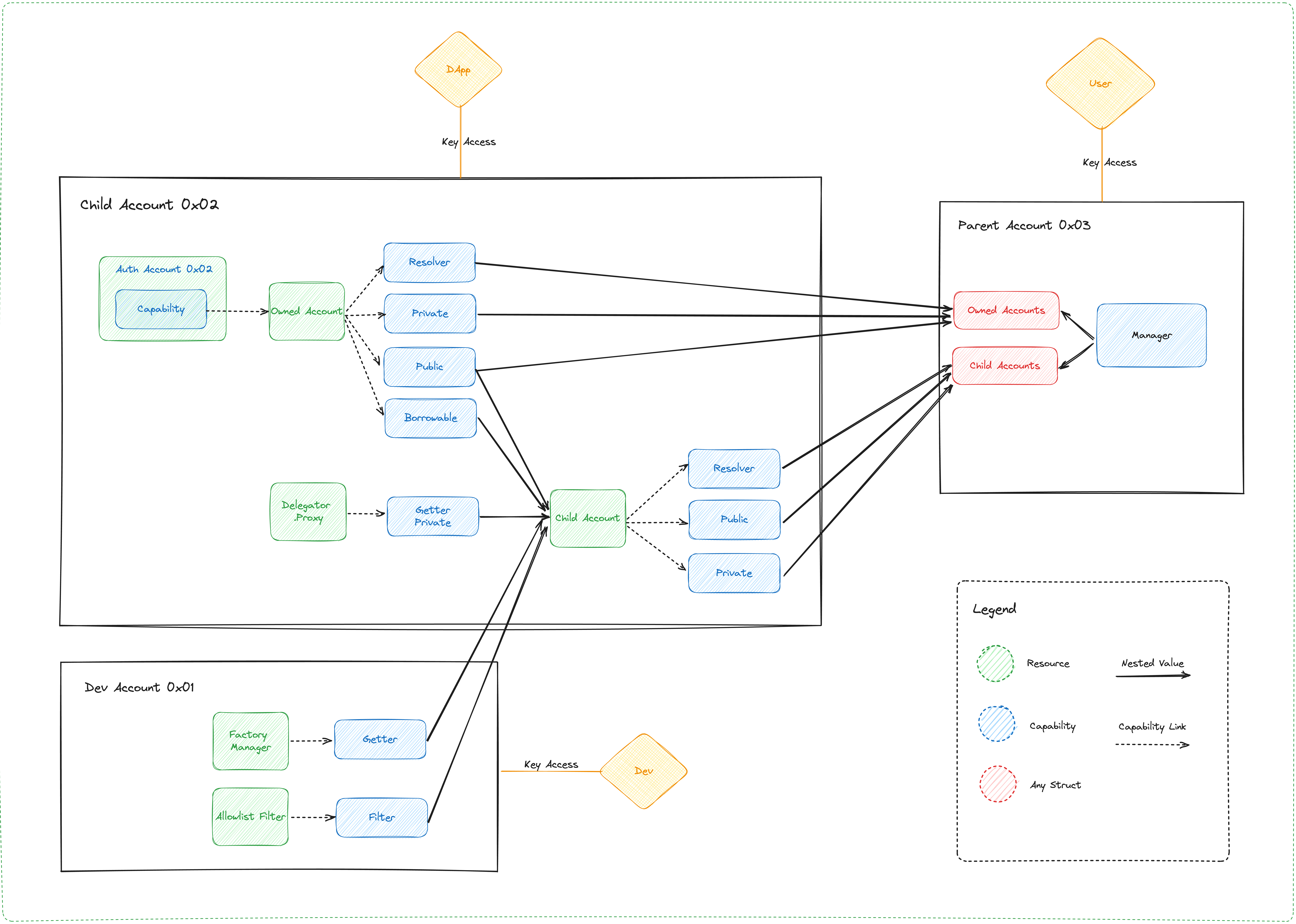
Parent accounts own a Manager resource which stores Capabilities to ChildAccount (restricted access) and OwnedAccount (unrestricted access) resources, both of which are stored in any given child account.
Therefore, the presence of a Manager in an account implies there are potentially associated accounts for which the owning account has delegated access. This resource is intended to be configured with a public Capability that allows you to query an account's child account addresses via getAccountAddresses() and getOwnedAccountAddresses(). As you can deduce from these two methods, there is a notion of "owned" accounts which we'll expand on later.
If a wallet or marketplace wants to discover all of a user's accounts and assets within them, they can first look to the user's Manager.
Identify account hierarchy
To clarify, insofar as the standard is concerned, an account is a parent account if it contains a Manager resource, and an account is a child account if it contains at minimum an OwnedAccount or additionally a ChildAccount resource.
Within a user's Manager, its mapping of childAccounts points to the addresses of its child accounts in each key, with corresponding values that give the Manager access to those accounts via corresponding ChildAccount Capability.
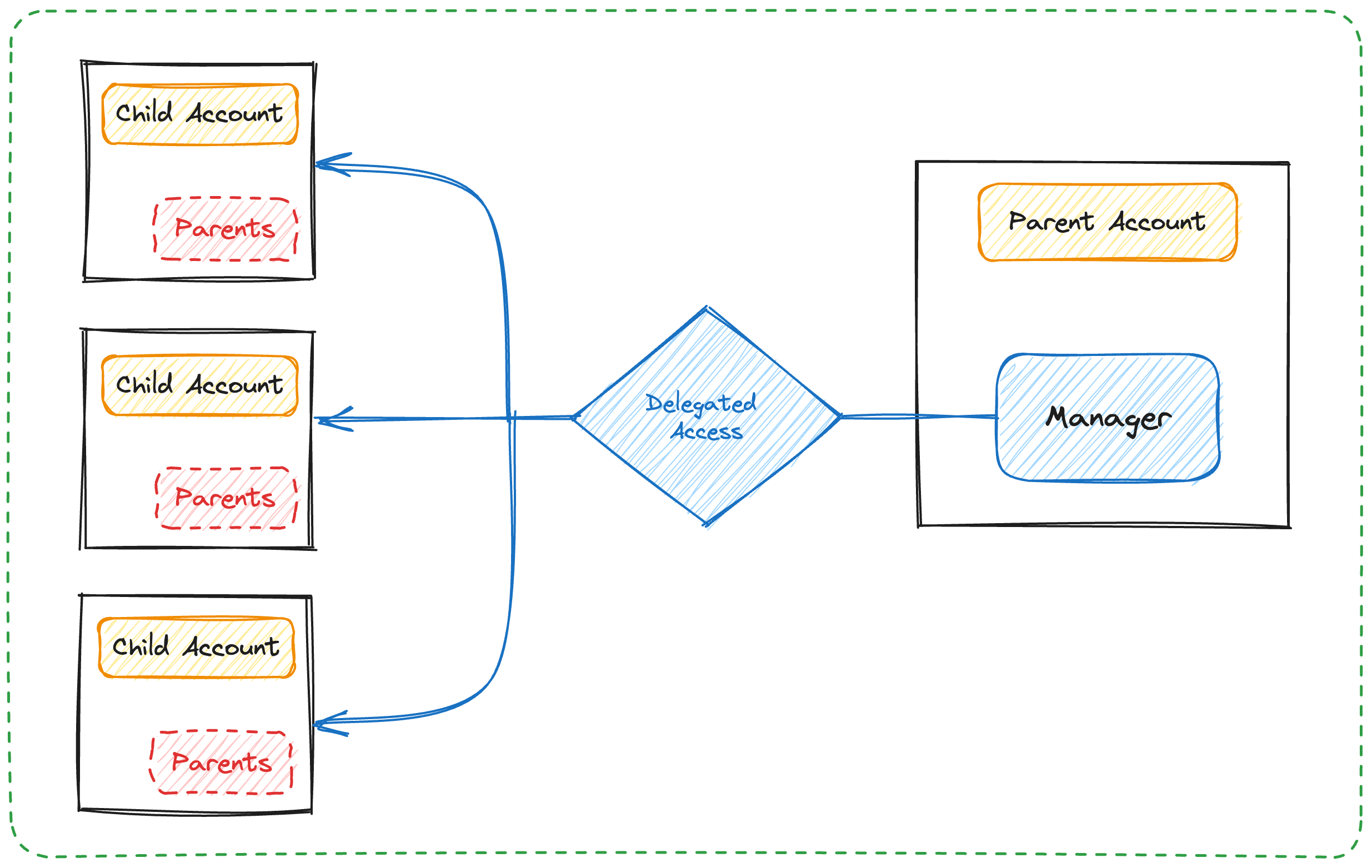
Likewise, the child account's ChildAccount.parentAddress (which owns a Manager) points to the user's account as its parent address. This makes it easy to both identify whether an account is a parent, child, or both, and its associated parent or child account(s).
OwnedAccount resources underly all account delegations, so can have multiple parents whereas ChildAccounts are 1:1. This provides more granular revocation as each parent account has its own Capability path on which its access relies.
Restricted vs. Owned Accounts
ChildAccount Capabilities allow access to the underlying account according to rules configured when the child account delegates access. The ChildAccount maintains these rules along with an OwnedAccount Capability within which the &Account Capability is stored. Anyone with access to the surface level ChildAccount can then access the underlying Account, but only within the pre-defined rule set. These rules are fundamentally a list of Types that can or can't be retrieved from an account.
The app developer can codify these rule sets on allowable Capability types in a CapabilityFilter along with a CapabilityFactory defining retrieval patterns for those Capabilities. When delegation occurs, the developer would provide the CapabilityFilter and CapabilityFactory Capabilities to an OwnedAccount resource which stores them in a ChildAccount resource. Then, capabilities are created for the OwnedAccount and ChildAccount resource and are given to the specified parent account.
So, if an app developer wants to turn on Hybrid Custody but doesn't want to allow parent accounts to access FungibleToken Vaults, for example, the app developer can codify rule sets enumerating allowable Capability types in a CapabilityFilter along with a CapabilityFactory defining retrieval patterns for those Capabilities.
When delegation occurs, they would provide the CapabilityFilter and CapabilityFactory Capabilities to an OwnedAccount. This OwnedAccount then wraps the given filter & factory Capabilities in a ChildAccount along with a Capability to itself before it publishes the new ChildAccount Capability for the specified parent account to claim.
If you enumerate allowable Types in your CapabilityFilter.Filter implementation, you by default exclude access to anything other than the Types you declare as allowable.
As mentioned earlier, Managers also maintain access to "owned" accounts - accounts which define unrestricted access as they allow direct retrieval of encapsulated &Account Capabilities. These owned accounts, found in Manager.ownedAccounts, are simply OwnedAccount Capabilities instead of ChildAccount Capabilities.
Considerations
This construction does not prevent an account from having multiple parent accounts or a child account from being the parent to other accounts. While initial intuition might lead one to believe that account associations are a tree with the user at the root, the graph of associated accounts among child accounts may lead to cycles of association.
We believe it's unlikely for a use case to demand a user delegates authority over their main account (in fact we'd discourage such constructions), but it might be useful to delegate access between child accounts. As an example, consider a set of local game clients across mobile and web platforms, each with self-custodied app accounts that have delegated authority to each other while both are child accounts of the user's main account.
Ultimately, it's' up to the wallet or marketplace who implements this how far down the graph of account associations they'd want to traverse and display to the user.
Implementation
From the perspective of a wallet or marketplace app, some relevant things to know about the user are:
- Does this account have associated linked (child) accounts?
- What are those associated linked accounts, if any?
- What NFTs are owned by this user across all associated accounts?
- What are the balances of all FungibleTokens across all associated accounts?
And with respect to actions on the assets of child accounts and management of the child accounts themselves:
- Access an NFT from a linked account's Collection
- Remove a linked account
Examples
Query whether an address has associated accounts
This script will return true if a HybridCustody.Manager is stored and false otherwise
Query all accounts associated with address
The following script will return an array of addresses associated with a given account's address, inclusive of the provided address. If a HybridCustody.Manager is not found, the script will revert.
Query all owned NFT metadata
While it is possible to iterate over the storage of all associated accounts in a single script, memory limits prevent this approach from scaling well.
Since some accounts hold thousands of NFTs, we recommend that you break up iteration and use several queries to iterate over accounts and the storage of each account. Based on the number of NFTs held, you might be required to batch the queries on individual accounts.
- Get all associated account addresses (see above).
- Loop over each associated account address client-side and get each address's owned NFT metadata.
For simplicity, we'll show a condensed query that returns NFT display views from all accounts associated with a given address for a specified NFT Collection path.
At the end of this query, the caller will have a mapping of Display views indexed on the NFT ID and grouped by account Address. This script does not take batching into consideration and assumes that each NFT resolves the MetadataViews.Display view type.
Query all acount FungibleToken balances
Similar to the previous example, we recommend that you break up this task due to memory limits.
- Get all linked account addresses (see above).
- Loop over each associated account address client-side and get each address's owned FungibleToken Vault metadata.
However, we'll condense both of these steps down into one script for simplicity:
The above script returns a dictionary of balances indexed on the type and further grouped by account Address.
The returned data at the end of address iteration should be sufficient to achieve a unified balance of all Vaults of similar types across all of a user's associated account as well as a more granular per account view.
You might resolve FungibleTokenMetadataViews to aggregate more information about the underlying Vaults.
Access NFT in child account from parent account
A user with NFTs in their child accounts will likely want to utilize said NFTs. In this example, the user signs a transaction with their authenticated account that retrieves a reference to a child account's NonFungibleToken.Provider, which allows withdrawal from the child account that signs as the parent account.
At the end of this transaction, you withdrew an NFT from the specified account with an NFT Provider Capability. A similar approach could get you any allowable Capabilities from a signer's child account.
Revoke secondary access on a linked account
The expected uses of child accounts for progressive onboarding implies that they will be accounts with shared access. A user may decide that they no longer want secondary parties to have access to the child account.
There are two ways a party can have delegated access to an account - keys and &Account Capability. With ChildAccount mediated access, a user wouldn't be able to revoke anyone's access except for their own. With unrestricted access via OwnedAccount, one could remove parents (OwnedAccount.removeParent(parent: Address)) thereby unlinking relevant Capabilities and further destroying their ChildAccount and CapabilityDelegator resources.
For now, we recommend that if users want to revoke secondary access, they transfer any assets from the relevant child account and remove it from their Manager altogether.
Remove a Child Account
As mentioned above, if a user no longer wishes to share access with another party, we recommended that they transfer desired assets from that account to either their main account or other linked accounts and the linked account be removed from their HybridCustody.Manager. Let's see how to complete that removal.
After removal, the signer no longer has delegated access to the removed account via their Manager and the caller is
removed as a parent of the removed child.
It's also possible for a child account to remove a parent. This is necessary to give application developers and ultimately the owners of these child accounts the ability to revoke secondary access on owned accounts.